首先来创建两个球体(Sphere),在GameObject->Create Other->Sphere,执行两遍,就有两个球体了,把它们分别命名为earth和moon,在Inspector里把earth的Scale参数全部改成5,这样看起来就比moon大了。下面我们实现环绕飞行。
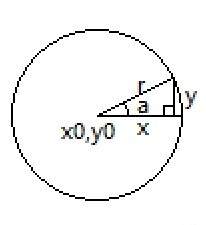
先来讲一下实现原理,看图
假设我们围绕的圆心坐标是x0,y0,围绕半径r和围绕角度a已知,现在我们来确定当前物体的x坐标和y坐标。
由三角函数可知:
x = r * cos(a) + x0;
y = r * sin(a) + y0;
由于a是角度,在Unity里要换算成弧度,因此需要
弧度 = 角度 * Math.Pi / 180
新建一个C#脚本,通过Assets->Create->C# Script,重命名该脚本,打开,输入如下代码,意思都写在注释里了
using UnityEngine;
using System.Collections;

public class surround : MonoBehaviour
{
	private float r = 9.0f;//半径
	private float originX;//圆心x坐标
	private float originY;//圆心y坐标
	private float originZ;//圆心z坐标
	private int angel = 0;//角度

	// Use this for initialization
	void Start()
	{
		GameObject centerObject = GameObject.Find("earth");//找到earth的GameObject
		originX = centerObject.transform.position.x;//确定圆心x坐标
		originY = centerObject.transform.position.y;
		originZ = centerObject.transform.position.z;
		TransformPosition(angel);//环绕
	}

	// Update is called once per frame
	void Update()
	{
		angel++;//每次转1度
		if (angel == 360)
		{
			angel = 0;//转360度后归零
		}

		TransformPosition(angel);//环绕
	}

	private void TransformPosition(int angel)
	{
		float x = originX + Mathf.Cos(angel * Mathf.PI / 180) * r;//获取moon x坐标
		float y = originY + Mathf.Sin(angel * Mathf.PI / 180) * r;//获取moon y坐标
		this.transform.position = new Vector3(x, y, originZ);//变换moon位置
	}
}
最后把这个脚本拖到moon打开的Inspector里就行了。运行一下看效果吧。
参考视频: unity3d视频22_环绕飞行